PrivacySentry brings category-first permission control to Android devices
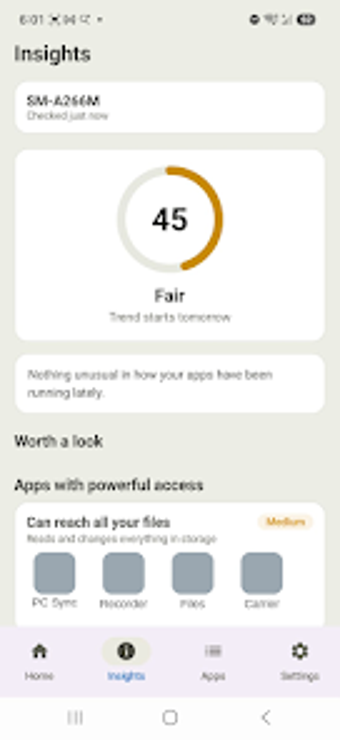
PrivacySentry groups permissions by category, displays a 0–100 Privacy Score, and guides users to system settings with one-tap navigation. Developed by Guhyata Inc for Android, the app targets privacy-conscious users who prefer a simpler permissions workflow. It highlights breach alerts tied to installed apps and tracks score trends over time, and its design aims to reduce the time spent hunting through native controls, making it accessible to everyday smartphone owners and security-aware individuals.
What the app actually does for device privacy
PrivacySentry flips the app-first model to a category-first view, listing Location, Camera, Microphone and other categories so you see every app with a given access right in one place. It generates a numeric Privacy Score from 0 to 100 to summarise device posture, and produces per-app access reports and risk analysis so you can inspect which apps touch sensitive hardware.
How it behaves on a running Android device
The developer optimised the app for current Android releases, and it operates primarily on-device, which reduces background data exchange. Because analysis runs locally, the tool does not rely on continuous cloud queries for basic permission scans; breach checks happen against known databases. That design limits network chatter during routine permission checks and keeps most work on the phone itself.
Safety and the app's security model
PrivacySentry uses read-only inspection of permissions and checks installed apps against breach records, and the developer states the app collects only minimal data for those checks. The app provides breach alerts for named apps, and its ad-free policy avoids third-party ad tracking, which lowers external tracking vectors compared with ad-supported utilities.
Who can operate it and how much expertise is required
The tool offers guided fixes with one-tap navigation to system settings, a workflow designed so non-technical users don't need to learn raw permission logs. Because the interface aims to simplify decisions rather than present low-level system traces, users who require forensic detail or raw permission auditing may find the presentation too high-level.
Practical recommendation and target user
PrivacySentry suits Android users who want a low-effort privacy checkup and straightforward remediation, especially those who prefer a category-based view and guided actions. Advanced users who need raw permission traces or forensic-level logging should expect a higher-level interface by design. As a practical step, review category views after installing new apps and use the breach alerts to prioritise account hardening. Recommended.